
Last updated: 1980-01-011 min read
⚔️ Turma - Settings
Overview
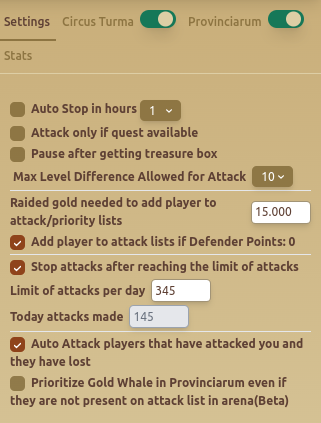
The Turma - Settings tab provides automation controls for handling Turma (PvP battles), allowing customization of attack strategies and limits.
Features
🕒 Attack Timing & Limits
- Auto Stop in Hours – Stops attacking after a set duration.
- Stop Attacks After Reaching Limit – Ensures the bot doesn't exceed a configured number of daily attacks.
- Limit of Attacks Per Day: Users can specify the maximum number of attacks allowed.
🎯 Attack Strategy
- Attack Only If Quest Available – Attacks only when there’s an active quest requiring fights.
- Pause After Getting Treasure Box – Pauses attacks after obtaining a treasure reward.
- Max Level Difference Allowed for Attack – Restricts attacks to enemies within a level range.
💰 Gold & Priorities
- Raided Gold Needed to Add Player to Priority Lists – Defines the minimum gold required before marking a player as a target.
- Add Player to Attack Lists If Defender Points = 0 – Automatically marks weak players as future attack targets.
🏆 Special Attack Rules
- Auto Attack Players That Have Attacked You and Lost – Ensures revenge attacks on weaker opponents.
- Prioritize Gold Whale in Provincarium Even if Not on List (Beta) – Targets high-value players automatically in Provincarium mode.
Best Practices
- ✅ Use daily attack limits to avoid excessive PvP losses.
- ✅ Adjust level difference settings to target optimal opponents.
- ✅ Enable revenge attacks to maximize efficiency.
FAQ
What is Turma - Settings?
The Turma - Settings tab provides automation controls for handling Turma (PvP battles), allowing customization of attack strategies and limits.
What are the key features of Turma - Settings?
Key features include: Auto Stop in Hours – Stops attacking after a set duration.; Stop Attacks After Reaching Limit – Ensures the bot doesn't exceed a configured number of daily attacks.; Limit of Attacks Per Day: Users can specify the maximum number of attacks allowed..