
Guide
🔥 Forge - Smelter
Overview
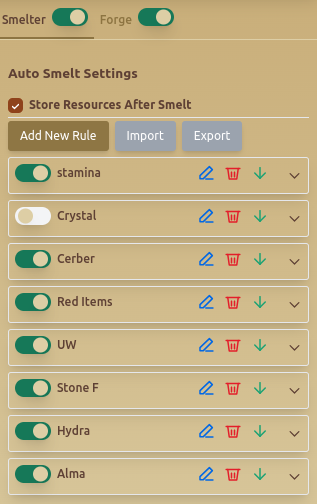
The Forge - Smelter tab is the Gladiatus smelting bot module for turning unwanted items into useful resources. It lets you automate smelting rules, decide which item types should be processed, repair items before smelting, choose hammer type, and store resources after the smelt is complete.
Use this guide when you want the Gladiatus bot to handle repeated smelting without manually checking every item in your inventory.
Features
🔄 Auto Smelt Settings
- Store Resources After Smelt – Ensures smelted resources are saved automatically.
- Add New Rule – Allows users to create custom smelting conditions.
- Import & Export Rules – Saves or loads smelting rule configurations.
🛠️ Custom Smelting Rules
Users can configure smelting rules based on conditions:
- Select Condition – Define criteria for smelting (e.g., Contain Resource).
- Set Title – Assigns a name to the smelting rule.
- Select Item Types – Choose which item categories to smelt:
- Helmets, Gloves, Shoes, Shields, Weapons, Chest Armour, Rings, Amulets.
⚒️ Repair & Smelting Configuration
- Repair Before Smelt – Ensures items are repaired before smelting.
- Use Hammer Type – Select hammer material for smelting:
- 🥉 Bronze, 🥈 Silver, 🥇 Gold.
📜 Example Smelting Rule
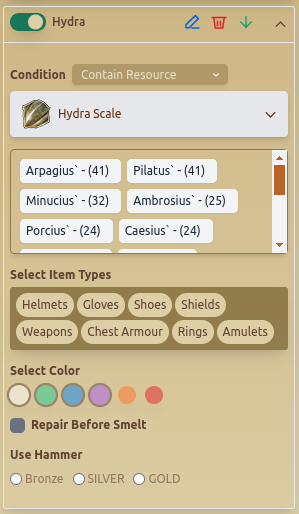
This example shows a rule for Hydra Scale, filtering specific item types and setting repair preferences.
When To Use Smelting Automation
- Use smelting automation when your inventory fills with items that are better converted into forge resources.
- Use resource-specific rules when you are farming materials for a planned forge craft.
- Use item-type filters when only certain categories are worth smelting for your account.
- Use Repair Before Smelt when repaired items produce better results for the rule you are running.
Recommended Setup
- Start with one narrow smelting rule for a resource you actually need.
- Select only the item types you are comfortable destroying.
- Enable Store Resources After Smelt so materials are saved automatically.
- Choose the hammer type based on the value of the items and the resource outcome you expect.
- Export working rules before testing a new smelting setup.
Common Mistakes
- Creating broad smelting rules that process valuable equipment by accident.
- Forgetting to enable resource storage after smelting.
- Using a high-value hammer type on low-value items.
- Running repair-before-smelt without checking whether the extra cost is worth it.
- Importing old rules without confirming item types and resource targets still match your current goal.
Best Practices
- ✅ Use Import & Export to switch between different smelting rules easily.
- ✅ Enable Repair Before Smelt to prevent unnecessary losses.
- ✅ Choose Use Hammer Type carefully to optimize material consumption.
Related Guides
FAQ
Can the Gladiatus bot smelt only selected item types?
Yes. Smelting rules can filter item categories such as helmets, gloves, shoes, shields, weapons, chest armour, rings, and amulets.
Can the bot repair items before smelting?
Yes. Enable Repair Before Smelt when you want the bot to repair matching items before processing them.
How do I avoid smelting valuable gear?
Use narrow item-type and resource conditions, test one rule at a time, and export safe rule sets before making broader changes.
FAQ
What is Forge - Smelter?
The Forge - Smelter tab is the Gladiatus smelting bot module for turning unwanted items into useful resources. It lets you automate smelting rules, decide which item types should be processed, repair items before smelting, choose hammer type, and store resources after the smelt is complete.
What are the key features of Forge - Smelter?
Key features include: Store Resources After Smelt – Ensures smelted resources are saved automatically.; Add New Rule – Allows users to create custom smelting conditions.; Import & Export Rules – Saves or loads smelting rule configurations..
What are recommended settings for Forge - Smelter?
✅ Use Import & Export to switch between different smelting rules easily. ✅ Enable Repair Before Smelt to prevent unnecessary losses. ✅ Choose Use Hammer Type carefully to optimize material consumption.