
Last updated: 1980-01-011 min read
⏸️ Pauses Tab
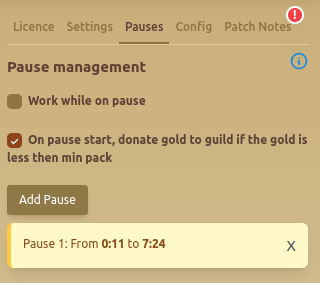
The Pauses Tab allows users to manage scheduled pauses and automate actions during these breaks.
⏯️ Pause Management
- Work while on pause: Toggle this option to allow background actions even when paused.
- On Pause Start, Donate Gold to Guild: If enabled, the script will donate gold to the guild when the player’s balance drops below a certain threshold.
🕒 Adding & Managing Pauses
- Click 'Add Pause' to define a new pause period.
- Add random start and end minutes to mimic a human activity, more minutes the better.
- Each pause period is displayed with its start and end times.
- Remove an existing pause by clicking the 'X' button next to it.
📌 Tip: Scheduling pauses can make automation appear more natural and reduce detection risks!
FAQ
What pause schedule looks most natural?
Use a long overnight pause of about 6-7 hours, then add 3-4 shorter pauses (around 1 hour each) during the day. Vary the exact times so your activity does not look perfectly consistent.
Should I enable "Omit pause from UW costume logic [O]"?
Only if you truly need it. Constant activity is a red flag, so use this option sparingly and keep long breaks in place.
Any general safety tips for running the bot?
Do not run 24/7, avoid max-efficiency settings all the time, and keep your activity patterns varied and human-like.