
Last updated: 1980-01-011 min read
🛒 Public Market - Sell
Overview
The Public Market - Sell tab allows users to automate selling items on the market based on predefined rules.
Features
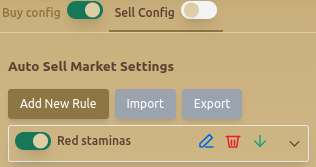
🏷️ Auto Sell Market Settings
- Buy Config / Sell Config Toggle – Enables or disables auto-buy and auto-sell configurations.
- Add New Rule – Allows users to define automated selling rules.
- Import & Export – Saves or loads selling rules for easy configuration management.
🔄 Custom Sell Rules
Users can define rules for automatic selling based on item conditions:
- Set Rule Title – Assigns a name to the selling rule.
- Select Item Types – Filters items by type (e.g., Forging Goods).
- Select Resource Type – Restricts selling to a specific material (e.g., Copper).
- Duration – Sets how long the item will be listed on the market.
- Select Color – Filters items by their in-game rarity colors.
- Sell Stacks of X Pieces – Defines stack size for market listing.
- Price Per Unit – Specifies the selling price per item.
- Max Number of Listed Items – Limits the total number of items listed.
- Allow Picking VAT from Gold Packages – Enables tax payment from gold packages.
📜 Example Sell Rule
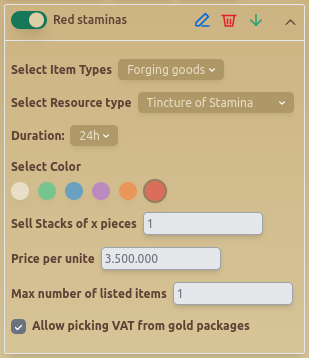
This example sets a rule to sell Copper from Forging Goods in stacks of 1 for 12,000 gold with a max listing of 1 item.
Best Practices
- ✅ Set Max Number of Listed Items to avoid overloading the market.
- ✅ Adjust Duration based on expected market demand.
- ✅ Enable Allow Picking VAT from Gold Packages to ensure seamless transactions.
FAQ
What is Public Market - Sell?
The Public Market - Sell tab allows users to automate selling items on the market based on predefined rules.
What are the key features of Public Market - Sell?
Key features include: Buy Config / Sell Config Toggle – Enables or disables auto-buy and auto-sell configurations.; Add New Rule – Allows users to define automated selling rules.; Import & Export – Saves or loads selling rules for easy configuration management..