
Guide
🛒 Public Market - Buy
Overview
The Public Market - Buy tab is the Gladiatus market bot module for automated buying. It watches the public market and buys items that match your custom rules for name, item type, quality, color, and maximum price.
Use this guide when you want to reduce manual market checking, buy materials or tools at safe prices, and keep strict limits so the bot does not overpay.
Features
🛍️ Auto Buy Market Settings
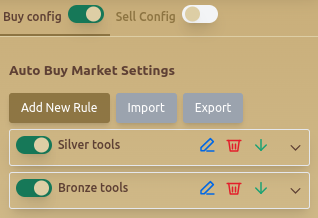
- Buy Config / Sell Config Toggle – Enables or disables auto-buy and auto-sell configurations.
- Add New Rule – Allows users to define automated purchase rules.
- Import & Export – Saves or loads buying rules for easy configuration management.
🔄 Custom Buy Rules
Users can define rules for automatic purchases based on item conditions:
- Set Rule Title – Assigns a name to the buying rule.
- Select Condition – Filters items by:
- Name Contains Any Of – Matches items with specific keywords (e.g., clo, bell).
- Item Types – Restricts purchases to specific categories (e.g., Tools).
- Tool Quality – Allows selection between Bronze, Silver, or Gold.
- Select Color – Filters items based on their in-game rarity colors.
- Max Price Per Unit – Defines the highest price the bot can pay per item.
- Auto Buy If Gold Available in Packages – Uses stored gold if needed.
📜 Example Buy Rule
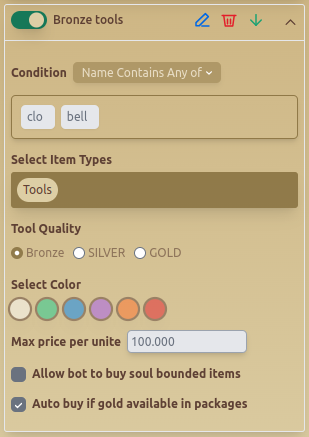
This example sets a rule to automatically buy Bronze tools with a max price of 100,000, allowing purchases from stored gold.
When To Use Auto Buy Rules
- Use auto-buy rules for items you repeatedly need, such as tools, materials, food, or gear filters.
- Use Name Contains Any Of when an item family has predictable names.
- Use quality and color filters when price alone is not enough to protect the rule.
- Enable stored-gold buying only when you are comfortable using package gold for market purchases.
Recommended Setup
- Create one rule per item group instead of one broad rule for everything.
- Set Max Price Per Unit before enabling a rule.
- Start with narrow filters, then broaden them after checking real market results.
- Export working rules after testing so you can restore them later.
- Pair market buying with Gladiatus hide gold automation if your market routine depends on stored gold.
Common Mistakes
- Leaving max price too high and buying overpriced items.
- Using a broad name filter that matches unrelated items.
- Enabling stored-gold buying without understanding how much gold the rule can spend.
- Importing old rules without checking whether prices changed on your server.
Best Practices
- ✅ Use Max Price Per Unit to avoid overpaying for items.
- ✅ Enable Auto Buy If Gold Available to maintain uninterrupted purchases.
- ✅ Regularly review Item Conditions to ensure efficient market transactions.
Related Guides
FAQ
Can the Gladiatus market bot buy only specific item types?
Yes. You can filter by item type, name keywords, tool quality, color, and price.
How do I stop the bot from overpaying?
Set a conservative Max Price Per Unit on every buying rule and test the rule before leaving it active for long sessions.
Can auto buy use gold from packages?
Yes, but only enable Auto Buy If Gold Available in Packages when you intentionally want stored gold used for market purchases.
FAQ
What is Public Market - Buy?
The Public Market - Buy tab is the Gladiatus market bot module for automated buying. It watches the public market and buys items that match your custom rules for name, item type, quality, color, and maximum price.
What are the key features of Public Market - Buy?
Key features include: Buy Config / Sell Config Toggle – Enables or disables auto-buy and auto-sell configurations.; Add New Rule – Allows users to define automated purchase rules.; Import & Export – Saves or loads buying rules for easy configuration management..
What are recommended settings for Public Market - Buy?
✅ Use Max Price Per Unit to avoid overpaying for items. ✅ Enable Auto Buy If Gold Available to maintain uninterrupted purchases. ✅ Regularly review Item Conditions to ensure efficient market transactions.